
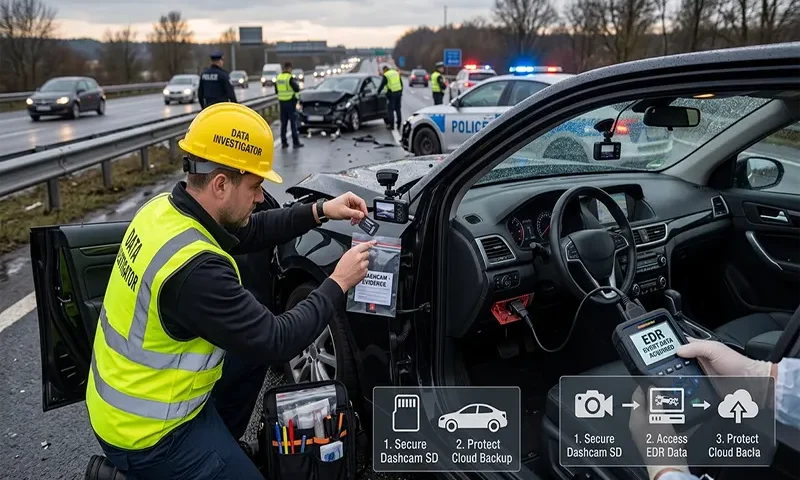
In the modern era of automotive technology, your vehicle is a silent witness that records the seconds leading up to and following a collision. Digital evidence, specifically from dashcams and Event Data Recorders (EDRs), is arguably the most objective account of an accident. However, unlike physical debris at a scene, digital data is incredibly perishable. If you do not act with precision in the minutes following an accident, that evidence can be permanently lost or overwritten.
Understanding the Difference: Dashcams vs. EDRs
To protect your evidence, you must first understand the distinction between your two main sources of data:
- The Dashcam: A consumer-grade device—usually mounted to the windshield—that records audio, video, and sometimes GPS data. Most dashcams operate on a “loop recording” cycle. Once the memory card reaches capacity, the device automatically begins overwriting the oldest footage with new data.
- The Event Data Recorder (EDR): Often referred to as a “black box,” the EDR is an internal computer module hardwired into a vehicle’s airbag control system. It records mechanical data such as speed, throttle position, braking input, and steering angle during a crash event.
The dashcam is yours to manage; the EDR, however, is a part of the vehicle’s complex diagnostic system and typically requires specialized software to access.
Immediate Field Actions: The First 30 Minutes
If you are involved in an accident, your priority is your safety and the safety of others. Once you have confirmed that you and your passengers are safe and you have called the authorities, you must shift your focus to digital preservation.
1. The “Power Down” Rule
Dashcams are the most vulnerable pieces of evidence. If your dashcam is still recording, you must prevent it from overwriting the crash footage. The safest action is to power down the camera immediately or, if it is a simple plug-and-play device, safely remove the SD card. Do not leave the car idling with the dashcam recording, as you risk the “loop” overwriting the crucial minutes of the accident.
2. Safeguarding the SD Card
If you remove the SD card, do not place it in a pocket where it can be crushed or lost. Place it in a secure, static-free container or a dedicated storage wallet. Do not attempt to view the footage on the side of the road using a laptop or smartphone, as accidental deletion or corruption is a significant risk in a high-stress environment.
The EDR/Black Box Dilemma
While you can physically hold your dashcam’s SD card, you cannot extract data from the vehicle’s EDR yourself.
- Do Not Discard the Vehicle: Many crash victims make the mistake of allowing their insurance company to haul their totaled vehicle to a salvage yard before the EDR data has been downloaded. Once a vehicle is moved to a salvage yard, it may be stripped for parts, crushed, or moved to a location where the data becomes inaccessible.
- Notify Your Counsel: If you have been injured, notify your attorney immediately that the vehicle contains an EDR. Your attorney can send a formal letter to the insurance company or the salvage facility instructing them to preserve the vehicle and the digital data.
Maintaining the Chain of Custody
A common mistake that ruins evidence is the desire to share it. In the excitement of having “proof” of an accident, many people upload their dashcam footage to social media or send it to friends. Do not do this.
- The Raw File is King: Courts require raw, unedited, and uncompressed footage to be considered authentic. If you crop the video, add music, or edit the brightness to “make it look better,” the opposing party’s attorney will argue that the video has been tampered with.
- Chain of Custody: This is the chronological documentation showing the seizure, custody, control, and transfer of evidence. By keeping the original file untouched and documenting exactly who has had access to it, you ensure the video is admissible in court.
Handling the Data: Digital Preservation
Once you are home and in a secure environment, you must create a forensic clone of your data.
- Copy, Don’t Move: Insert the SD card into a computer using a card reader. Copy the entire contents of the card to a secure hard drive or a cloud storage account. Never move the files by “cutting and pasting,” as a power failure during the move could result in catastrophic data loss.
- Verify the Files: Ensure that the files can be opened and that the video is intact.
- Physical Storage: Store the original SD card in a fireproof, secure location. Treat this SD card as you would a high-value piece of jewelry or a government document.
Forensic Fact: Do not believe the myth that “if the police didn’t take it, I don’t need to save it.” Police officers are often overwhelmed at crash scenes and may not have the resources or technical expertise to secure dashcam footage. The responsibility of preservation falls entirely on the driver.
Legal Intervention: The Spoliation Letter
If the accident involved a commercial delivery truck or a large company, the other party’s insurance provider is likely aware of the value of their vehicle’s EDR data. To prevent them from “losing” or destroying that data, your attorney will issue a Spoliation Letter. This is a formal legal demand that mandates the preservation of all electronic records related to the accident. If they destroy the evidence after receiving this letter, they may face significant legal penalties.
Data is the silent witness that never forgets, but it is also fragile. In the moments after an accident, the adrenaline is pumping, and your brain is preoccupied with the shock of the event. However, by acting as a custodian of your digital data—securing the SD card, keeping the footage raw, and ensuring the vehicle remains intact until the EDR is downloaded—you are taking the necessary steps to hold the negligent party accountable. Do not assume that the system will automatically preserve the evidence for you; in the digital age, evidence preservation is a proactive responsibility that rests firmly in your hands.

