
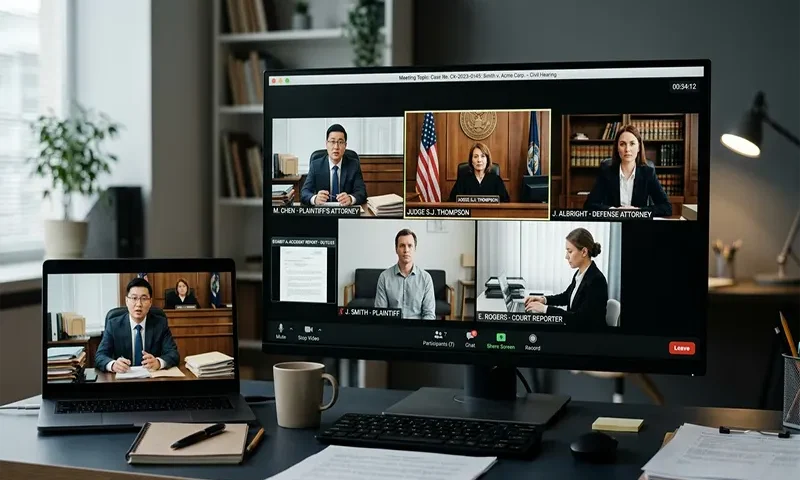
The transition to virtual courtrooms has been one of the most significant shifts in the modern judicial landscape. While the setting has moved from a physical mahogany-paneled room to a digital interface, the gravity, rules, and expectations of the judicial process remain unchanged. If you have a civil hearing scheduled via Zoom, it is natural to feel anxious, but understanding the mechanics of the virtual courtroom can transform your experience from a stressful tech-challenge into a structured, manageable legal proceeding.
Preparation: The “Pre-Game” Strategy
Preparation is the single most effective antidote to courtroom anxiety. In a virtual environment, your “courtroom” is wherever your camera is pointed.
Technical Setup
Your technology is an extension of your presence. A poor setup can distract from your arguments or, in extreme cases, be perceived as a lack of respect for the court.
- Connection: Use a hardwired internet connection if possible. If you must use Wi-Fi, ensure you are close to the router.
- Environment: Choose a quiet, private space where you will not be interrupted. A neutral background—such as a blank wall or a tidy office corner—is ideal. Avoid using distracting virtual backgrounds unless they are professional and static.
- Positioning: Place your camera at eye level. Looking down into a laptop camera creates an unflattering angle; looking up at a screen forces you to look away from the judge.
Digital Document Management
In a physical court, you have a table to spread out your files. In a virtual court, you have a screen.
- Organization: Create a folder on your desktop containing all exhibits, pleadings, and notes. Name them clearly (e.g., “Exhibit_A_Contract,” “My_Opening_Statement”).
- The “Two-Monitor” Rule: If possible, use two screens. Place the Zoom window on one and your digital files on the other. This prevents you from having to minimize the judge’s video to find your documents.
Pro-Tip: Print a hard copy of your most critical documents. Technology can fail, but a paper file on your desk is a reliable backup if your screen freezes or your software crashes.
Virtual Decorum: The Camera is Always On
One of the biggest pitfalls for participants is forgetting that the camera is always recording or being watched by the judge and clerk.
- Dress Code: Treat a Zoom hearing exactly as you would an in-person appearance. Wear professional, conservative attire. Avoid busy patterns, which can strobe on camera, and ensure your lighting is in front of you, not behind you (backlighting will turn you into a silhouette).
- Eye Contact: This is the most common mistake. When you speak, look directly into the camera lens, not at the judge’s face on your screen. This creates the illusion of eye contact, which is essential for conveying sincerity and focus.
- Addressing the Court: Maintain formal address. Refer to the judge as “Your Honor” at all times. Do not talk over others; wait for a distinct pause before responding to ensure the audio does not clip or overlap.
The Virtual Process: A Step-by-Step Walkthrough
Most virtual hearings follow a standard protocol designed to maintain order in a digital space.
- The Waiting Room: You will likely be placed in a Zoom “Waiting Room.” Remain patient. The judge may be finishing another matter. Do not log off or assume the meeting is broken; stay active until the host admits you.
- Verification: Upon entry, the clerk or judge may ask you to state your name and confirm you are in a private location where you cannot be overheard.
- Swearing In: If you are testifying, the clerk will administer the oath virtually. Ensure you are sitting upright and are ready to provide your statement clearly.
- Flow of Conversation: The judge controls the “mute” button. If you are muted, do not attempt to speak. Wait for the judge to invite your testimony or argument. If you are sharing your screen to show an exhibit, ensure you have closed all non-relevant tabs or notifications (like email pop-ups) to prevent private information from being broadcast.
Troubleshooting: What to Do When Things Go Wrong
Even with perfect preparation, technical glitches happen. The most important rule is: Do not panic.
- If You Lose Connection: Stay calm. Immediately attempt to rejoin the meeting. If you cannot rejoin, have the clerk’s office or the court’s technical support number saved on your phone. Call them immediately to explain the situation. Judges are accustomed to internet drops and are generally understanding, provided you make an immediate effort to reconnect.
- If Audio Fails: Use the chat feature if it is enabled to inform the court that you are having technical difficulties. If the chat is disabled, use your phone to call the chambers or the clerk’s office.
Pro-Tip: Keep your smartphone charged and nearby, turned to silent, but ready to use as a backup communication device if your primary computer experiences a critical failure.
Final Thoughts
The virtual courtroom is simply a new medium for an old process. By mastering your digital environment, you remove the unnecessary variables of technical frustration, allowing you to focus entirely on the substance of your case. Being prepared, professional, and composed—both in your attire and your digital setup—signals to the court that you are a serious participant. Remember, while the judge may be on a screen, the justice being administered is very real. Approach your hearing with the same respect and attention to detail you would bring to a physical courthouse, and you will find yourself well-equipped to navigate the proceedings.

